Decision making games for teams: ideas and a 60 minute agenda

Decision making games for teams give you a safe way to look at how your group chooses, argues, and commits, without the pressure of a real customer or deadline. In one short session you can see which habits help you and which quietly slow everything down.
Many teams struggle with transactional decisions, for example who picks up an urgent task, which ticket gets bumped, or which customer gets a discount. These choices look small, but they add up to real cost, missed opportunities, and frustration. Decision making games for teams turn those everyday patterns into something visible, so you can talk about them, adjust them, and experiment with better ways of working.
If you already run regular retrospectives or virtual sessions, you can combine decision making games for teams with short debriefs and browser based activities. For example, you might pair them with online team building games you already use in your remote meetings or with Superglue’s browser based escape rooms and communication puzzles.
Decision making games for teams: common problems they can fix
Before we get into specific game ideas, it helps to name the typical problems that show up around decisions:
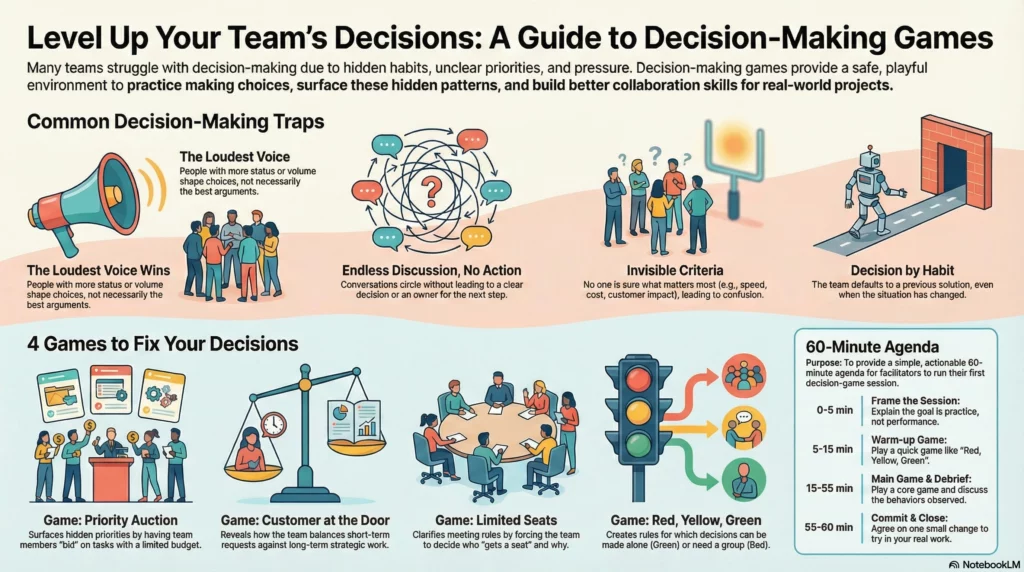
- Loudest voice wins instead of the best argument. People with more status or volume shape every choice.
- Endless discussions that never lead to a clear decision or owner.
- Parking lot decisions that get postponed again and again, then are made in a rush at the last minute.
- Invisible criteria where nobody is sure what matters most, for example speed, cost, or customer impact.
- Decision by habit where the team copies last time’s solution, even when the context changed.
These patterns are hard to talk about in the middle of a real project, especially when emotions and deadlines are involved. This is why decision making games for teams are useful. They move the conversation into a playful scenario where nobody’s job is at risk, so people can be more honest about what really happens.
Why decision making games for teams work
Good decision making games for teams create a small, controlled version of reality. They work because they combine three elements:
- Clear constraints like limited time, budget, or capacity. These force trade offs, just like real projects.
- Visible options and outcomes written on a board or screen. Everyone sees the same information, which reduces confusion.
- Structured reflection right after the game. The debrief connects game behavior to real work, so insights do not stay abstract.
Psychologists talk about the value of simulation and rehearsal in learning. When people run through situations in a low risk setting, they build mental models they can reuse later. Decision making games for teams are exactly this kind of rehearsal. You practice how to speak up, how to disagree, and how to make trade offs, then you carry those skills back into real meetings.
If you want to read more about how structured decision processes help teams, you can look at resources like this Harvard Business Review checklist for faster, better decisions. Your games do not need to be complicated to bring some of these ideas to life.
How decision making games for teams work in practice
Most decision making games for teams follow a simple arc:
- Set the scene with a short story and clear rules. Everyone knows what the goal is and what the constraints are.
- Play in rounds with a visible clock. Time pressure is mild, not stressful, so people stay engaged.
- Capture the result as a list of chosen options, a ranking, or a map. This is the data you will discuss later.
- Debrief with questions about how the group decided, not just what they decided.
- Translate the insights into concrete changes to your real processes.
You do not need special software to run them, although browser based tools and video integration can make remote sessions smoother. Many teams run decision making games for teams as part of a regular remote workshop using a video call and a shared online board.
Game idea 1: Priority Auction
The Priority Auction is one of the simplest decision making games for teams. It turns your backlog into an auction where everyone gets a limited budget.
Problem this game surfaces
In many teams, prioritization happens in someone’s head or in a rushed meeting. People leave unsure why certain items were picked. The Priority Auction makes those hidden preferences visible.
How to play
- Collect 8 to 12 real or realistic tasks from your backlog.
- Give each person the same budget, for example 100 credits.
- Show each item in turn. Everyone secretly writes how many credits they want to invest.
- Reveal and sum the bids, then rank items by total credits spent.
Why it works
This game forces trade offs. People who try to support everything run out of credits. You see which items the group values most, and where there is quiet disagreement. During the debrief, you can connect these patterns to your real planning process and to any priority framework you use, for example RICE or MoSCoW. For a deeper dive into prioritization methods you can link this exercise to ProductPlan’s overview of prioritization.
How to run it with Superglue
Inside a Superglue session, you can start with a short browser based decision game to warm up the group, then switch to a shared board where you run the Priority Auction on your real backlog. The shift from a playful puzzle to your actual tasks makes it easier to keep energy high while still getting a concrete result at the end.
Game idea 2: Customer at the Door
Customer at the Door is another practical example of decision making games for teams. It focuses on how you handle short term customer requests versus long term work.
Problem this game surfaces
Teams often feel pulled in every direction by customer requests. Some requests are important, others are distractions, but in the moment it can be hard to tell which is which. People say yes because they want to be helpful, then regret it later.
How to play
- Prepare 5 to 7 short customer scenarios with different levels of urgency and impact.
- Split into pairs or small groups.
- For each scenario, ask groups to choose one option: act now, defer, or say no.
- Write each choice and a short reason on the board, then compare across groups.
Why it works
This game shows what your team really values when the pressure is on. Do you always favor big current customers, even if a fix would help hundreds of smaller ones. Do you sacrifice long term product quality for short term happiness. In the debrief, you can compare the game choices to your official customer policy and decide if your actual behavior matches your stated strategy.
Game idea 3: Limited Seats
Limited Seats is a quick decision making game for teams that helps you clean up who is invited to which meeting or project.
Problem this game surfaces
Overloaded calendars are often a sign of unclear decision rules. People attend meetings “just in case” or because they always did in the past. This drains focus and slows decisions.
How to play
- Choose a real recurring meeting or project with too many people involved.
- List 10 possible roles or people who might join.
- Tell the group there are only 5 seats. As a team, decide who gets them and why.
- Once the list is final, ask everyone privately if they truly agree.
Why it works
The game surfaces unspoken rules about status, politics, and fear of missing out. If people are afraid to leave someone out, that will show up. You can then design simple rules, for example “one decision owner, one subject matter expert, one representative from X team”, instead of inviting every stakeholder by default.
Game idea 4: Red, Yellow, Green
Red, Yellow, Green helps decision making games for teams address another common pain point: which decisions really need a meeting.
Problem this game surfaces
Some teams spend too much time escalating small questions, others leave people to handle big risks completely alone. Both patterns create stress and slow progress.
How to play
- Brainstorm 10 to 15 routine decisions from your daily work.
- Give everyone three virtual labels: green (decide alone), yellow (check with one person), red (needs a group).
- Vote on each decision at the same time, then discuss any mixed results.
Why it works
This simple classification gives you a shared language. After the game, you can update your team agreement or onboarding guide so new people understand which decisions they can make on their own and which need alignment.
A 60 minute agenda using decision making games for teams
Here is a ready agenda you can plug into your next workshop or online session. You can run it with simple tools, or with a dedicated platform for browser based team games like Superglue Games sessions.
0 to 5 minutes: Frame the session
- Explain that this is practice, not performance. The goal is to learn how you decide, then improve it together.
- Pick one focus, for example speed versus quality, or short term versus long term.
5 to 15 minutes: Warm up game (Red, Yellow, Green)
- Use real routine decisions from your team.
- Capture two or three rules of thumb you want to try over the next week.
15 to 40 minutes: Main game (Priority Auction or Customer at the Door)
- Choose one of the main decision making games for teams described above.
- Play in short rounds with clear time boxes.
- Keep a visible record of final rankings or choices.
40 to 55 minutes: Debrief and connect to real work
- Ask how the group decided, who influenced the result, and where people felt stuck.
- Invite examples of real decisions that feel similar to what happened in the game.
- Note any concrete changes you want to try in backlog grooming, customer support, or planning.
55 to 60 minutes: Commit and close
- Agree on one small experiment for the next sprint or month.
- Write it into your usual system, for example your retro notes or task tracker.
Bringing decision making games for teams into your regular rhythm
The biggest impact comes when decision making games for teams are part of your regular cadence, not a one off workshop. You might:
- Add a 15 minute game to the start of every monthly retro.
- Rotate through different games each quarter with a new focus, for example customer decisions, technical debt, or team capacity.
- Link game insights to your existing retrospective questions so you build on them over time.
Over time, you will probably notice that fast, transactional choices feel calmer and more intentional. People share their reasoning more often, ask better questions, and push back when needed. The same skills also support bigger strategic decisions, which means the benefits of decision making games for teams stretch far beyond the hour you spend playing them.